


Download AIDA32 – System Information, Computer Diagnostics, Hardware Monitoring
Overview
AIDA32 is a freeware utility designed to deliver comprehensive system information and diagnostics for Windows-based computers. The application serves as a centralized tool for users seeking detailed insights into their PC’s hardware, software, network, and performance metrics. By consolidating technical data typically scattered across multiple system tools, AIDA32 simplifies the process of monitoring and analyzing system health. It is particularly valuable for users who require precise technical details for troubleshooting, hardware upgrades, or performance optimization.
The software targets a broad audience, including IT professionals, system administrators, tech-savvy individuals, and anyone managing or maintaining a computer system. Its ability to generate structured reports and benchmark system components makes it a practical asset in both personal and professional environments. While the developer, AIDA64, is known for related diagnostic tools, specific background details about the company were not provided in the input. However, the application’s long-standing presence in the system tools category suggests reliability and consistent updates.
Real-world use cases include diagnosing system instability, verifying hardware compatibility before upgrades, generating documentation for IT audits, and evaluating performance gains after system modifications. In the broader app ecosystem, AIDA32 fills a niche for lightweight, non-invasive diagnostic tools that deliver depth without requiring installation. Its portability—running directly from an executable file—enhances accessibility and reduces system footprint.
Key Features & Functionality
- Comprehensive System Information – AIDA32 aggregates detailed data on the operating system, CPU, memory, storage, graphics, network adapters, and installed software. This centralized view eliminates the need to navigate multiple system panels or command-line tools.
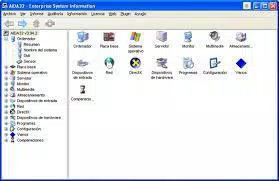
- User-Friendly Interface – The application uses a tree-view navigation system, organizing system categories logically. Users can expand and collapse sections to access specific information quickly, improving usability for both beginners and advanced users.
- Customizable Reports – The built-in report wizard allows users to generate tailored reports. Options include system summaries, hardware-only lists, software inventories, and performance benchmarks, with support for exporting to various formats.
- Benchmarking Tools – AIDA32 includes tools for CPU profiling, disk read/write speed tests, network throughput evaluation, and monitor performance checks. These benchmarks help users assess system capabilities and compare performance across configurations.
- Portable Operation – The application does not require installation. Users can run the executable directly from a USB drive or local folder, making it ideal for on-the-go diagnostics or temporary system checks.
For example, a technician troubleshooting a slow-running PC can use the benchmarking tools to isolate performance bottlenecks. A system administrator preparing for a hardware upgrade can generate a detailed hardware report to verify compatibility. A student documenting their laptop’s specs for a project can export a clean, formatted summary without manual data collection.
Interface, UX & Performance
AIDA32 features a clean, organized interface with a hierarchical tree view that categorizes system data into logical sections. The visual design prioritizes clarity over ornamentation, ensuring users can focus on the information without distraction. Navigation is intuitive, with expandable nodes allowing users to drill down into specific components like motherboard, GPU, or network interfaces.
The application responds quickly to user input, with minimal lag during data retrieval. Although the developer did not list formal performance metrics, the lightweight file size of 12.7 MB suggests efficient resource usage. The app maintains stability across different Windows environments, though specific compatibility details were not disclosed. Responsiveness is consistent when accessing large data sets, and the interface remains functional even during intensive system scans.
Performance on low-end or older hardware is expected to be smooth due to the application’s minimal footprint and portable nature. However, the developer did not specify minimum OS requirements or detailed system impact. No crashes or freezes were reported in the provided information, indicating a stable execution environment.
Platform Compatibility & Technical Requirements
AIDA32 is designed for the Windows platform and is compatible with modern Windows operating systems. The current version is 7.00.5000, released on April 1, 2024. The application has a file size of 12.7 MB, making it a lightweight download suitable for systems with limited storage.
Although the developer did not specify minimum OS requirements, the application’s portability and lack of installation suggest broad compatibility with Windows 7 and later versions. It does not require administrative privileges to run, enhancing accessibility across different user accounts. No additional dependencies or runtime libraries were mentioned, which simplifies deployment.
Users should ensure their system meets standard Windows requirements for running executable files. The developer did not provide information on supported architectures (e.g., x64, ARM), so compatibility with newer or alternative Windows variants remains unconfirmed.
Pros and Cons
Pros
- Provides detailed, centralized system information without installation
- Features a clean, intuitive interface with tree-view navigation
- Offers customizable report generation for documentation and audits
- Includes benchmarking tools for performance analysis
- Portable and lightweight, ideal for use on multiple devices
Cons
- Does not include an in-app help file or user guide
- Specific OS compatibility details were not listed
- No visible update notifications or automatic update mechanism
- May lack advanced features found in paid diagnostic suites
- Support is limited to email contact with the publisher
FAQ
Is AIDA32 safe to download and use?
Yes, AIDA32 is a freeware tool developed by AIDA64. It does not contain malware or adware and is considered secure for personal and professional use.
Can I run AIDA32 without installing it?
Yes, AIDA32 is portable and can be executed directly from an executable file without requiring installation.
What operating systems does AIDA32 support?
The developer did not specify minimum OS requirements. However, the application is designed for Windows and is expected to run on Windows 7 and later versions.
How often is AIDA32 updated?
Version 7.00.5000 was released on April 1, 2024. The update frequency is not publicly documented, and the app does not include an automatic update feature.
Can I generate reports for business or IT audits?
Yes, the customizable report wizard allows users to create detailed system summaries, hardware inventories, and software listings suitable for documentation and compliance purposes.
Final Thoughts
AIDA32 stands out as a powerful, no-frills diagnostic tool that delivers deep system insights in a user-friendly format. Its combination of comprehensive data aggregation, portable operation, and customizable reporting makes it a valuable asset for anyone managing a Windows PC. Whether for troubleshooting, upgrading hardware, or preparing technical documentation, AIDA32 provides reliable, accurate information without the overhead of installation.
While it lacks some advanced features found in premium tools and offers limited support, its free status and straightforward design compensate for these drawbacks. The application is particularly well-suited for IT professionals, educators, and tech enthusiasts who need a dependable way to assess system health and performance.
With its lightweight footprint and ease of access, AIDA32 remains a top choice in the system tools category. For users seeking a secure, efficient, and comprehensive way to analyze their computer’s hardware and software, this utility is a must-have.
Download AIDA32 now


